
Server settings and server.cfg
The Config tab is where a server is set up. Everything here is a form, and it writes a real server.cfg for you, so you never have to hand-edit a startup script. If you do want to hand-edit the file, you can, and Crucible Local Server will not overwrite your edits.
Most of this tab is disabled while the server runs
Section titled “Most of this tab is disabled while the server runs”Rust reads the boot settings once, at startup, so changing them under a live server would only make the form disagree with what is actually running. While a server is up, those fields are greyed out and cannot be edited, and a line at the top of the tab says so:
Stop the server to change anything it only reads at boot. Live server rules and restart settings can still be changed while it runs.
That covers identity, slots and gameplay, network, world, admins and performance. The live server rules and the restart schedule stay editable, because the rules go out over RCON and the schedule is the app’s own. Everything you change while stopped takes effect the next time the server starts.
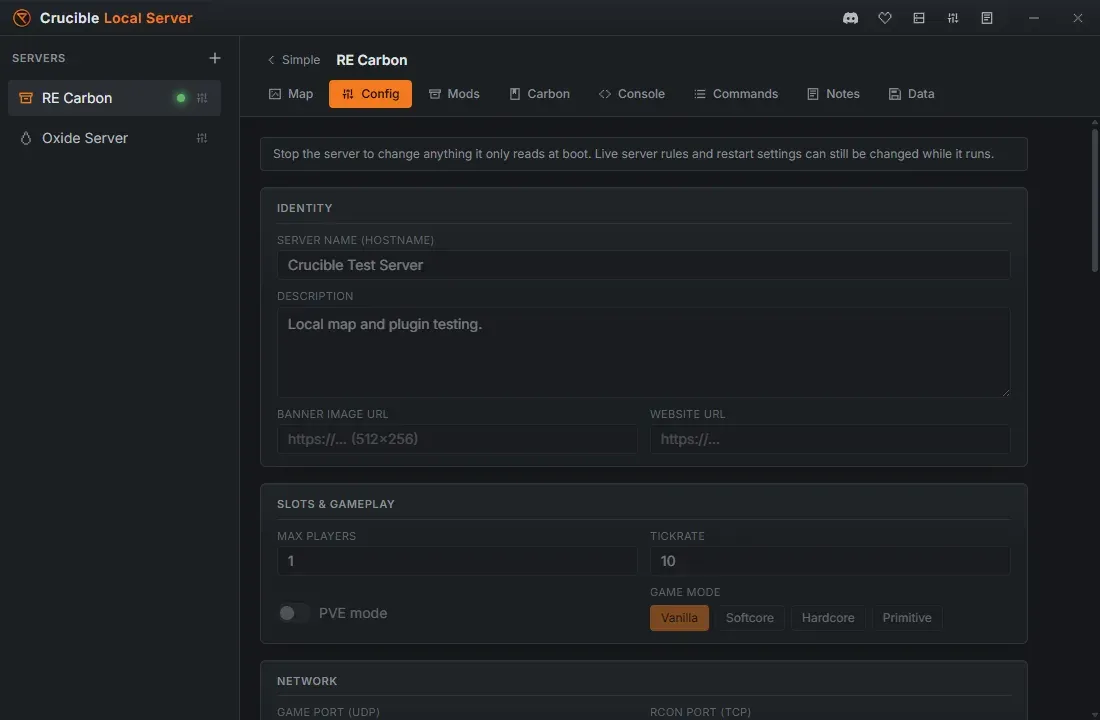
Identity
Section titled “Identity”- Server name (hostname): what players see in the server browser.
- Description: the blurb on the server’s page. It can run to several lines.
- Banner image URL and Website URL: shown on the server’s page in game. These are URLs the Rust client fetches, so a path to a file on your own PC will not show for anyone. Use a hosted image (512x256).
Slots, gameplay, and game mode
Section titled “Slots, gameplay, and game mode”- Max players and Tickrate. Tickrate accepts 1 to 30, the range Rust actually runs at.
- PVE mode.
- Game mode: Vanilla, Softcore, Hardcore or Primitive. This sets
server.gamemode, which is what stops the Rust client branding your server as a “Development Server”.
Choose a procedural world (a seed and a world size, with a random-seed button) or a custom map. Rust accepts a world size from 1000 to 6000, and a seed from 1 to 2147483647. Crucible keeps every value you type inside the range the game actually accepts, so a typo cannot silently generate a different world than the one you asked for. Seed 0 is not allowed on purpose: Rust reads it as “pick one for me”, so it would not reproduce the world you think it does.
Assigning a custom map drops the seed and world size, because the map file defines the world instead. See run a custom map on your server.
Network and the RCON password
Section titled “Network and the RCON password”The game port and RCON port are set for you and are unique per server, so two servers can never collide. Two servers cannot be given the same port.
The game port accepts 1024 to 65533, and the RCON port 1024 to 65535. The game port stops just short of the top because the Steam query port is the game port +2, and that has to stay a real port.
Forwarding these ports has a cost
Section titled “Forwarding these ports has a cost”The app deliberately does not touch your router, so nothing here is exposed until you forward it yourself. Before you do, the warning under the port fields is worth reading twice:
- Forwarding these ports makes your home connection reachable from the internet, and anyone you hand the address to learns your public IP.
- Rust servers are a common target, so share it only with people you trust, or put it behind a relay or a rented host that hides your address. A relay like playit.gg or Tailscale needs no router setup and works behind CGNAT.
- Never forward the RCON port. It is full remote control of your server, not just a way in to play.
The RCON password is what turns the two-way console on. Crucible generates a strong one for every new server, and you can regenerate it or set your own. It is masked, with a reveal toggle.
Rust refuses to run RCON at all on a handful of common passwords (password, 123456, changeme, qwerty and a few others). With RCON off, the console goes one-way, the quick actions and live stats stop working, and a scheduled restart cannot fire. Crucible will not let you save one of those passwords. A short password is only insecure, not broken, so it is allowed with a warning.
Live server rules
Section titled “Live server rules”A grid of one-click toggles for the things you would otherwise look up a convar for.
The world and event side:
- Bradley APC, Timed events, Cargo Ship, Radiation, Scientists / NPCs, Structural stability, Halloween event and Christmas event.
The build and creative side:
- No animals: sets every wildlife population to zero. Flipped on while the server runs, it also despawns the animals already roaming.
- Passive scientists: scientists still spawn, but they do not move and they ignore players. A populated monument you can walk through.
- Lock time to 16.8 and Lock clear weather: hold late-afternoon light and a clear sky instead of letting the world cycle.
- Spawn loot on start: fills the loot containers the moment the world reaches Live, rather than waiting for the spawn cycle to come round.
- No decay and No building upkeep: a base you build for a test is still there next week.
- Instant craft.
- Relaxed anti-cheat: violations are logged but never kick or disconnect anyone, and flying or noclipping under the terrain no longer kills you. This is what makes a build or cinematic server usable without getting thrown out of it.
- Creative mode for everyone: hands Rust’s native creative tools to every player on the server, not only to admins.
- Free build: build without the resources.
- Free placement: place pieces without the usual snapping and placement rules.
- Free repair: repairs cost nothing.
- Instant placement: deployables go down immediately, with no hold-to-place delay.
- Always-on entities: electrical and IO deployables run without being powered.
- Unlimited IO: lifts the power budget on electrical connections, so wiring does not have to be planned around it.
They are baked into server.cfg, so they survive a restart, and they apply live over RCON when the server is running. Lock time to 16.8 and Lock clear weather hold from the moment the server is Live. Flipping a rule while the server is up takes full effect on the world already loaded, not just future spawns: turning No animals on despawns the animals already roaming, rather than only stopping new ones.
Performance
Section titled “Performance”- Skip AI navmesh (faster boot): skips building the AI navmesh, so the server starts much faster and uses less CPU. NPCs and animals will not move, which is fine for a build or map-test world, or when running several servers at once.
- High priority and CPU cores: run the server at a higher CPU priority, and optionally pin it to specific cores (for example the 3D V-cache cores on an AMD X3D chip). Leave CPU cores blank to use all cores.
Restart fields
Section titled “Restart fields”The restart schedule sits on this tab, just above the live rules, and is covered in full in restart your server automatically. Its three numbers are bounded:
- Warn players for this many minutes: 0 to 60.
- Chat reminder every N minutes: 0 to 60. Zero means the native restart banner only, with no extra chat lines.
- Manual restart delay in seconds: 0 to 3600. This is the countdown the Restart button announces, separate from the schedule.
Like the live rules, these stay editable while the server runs.
The server.cfg editor
Section titled “The server.cfg editor”Open server.cfg (advanced) at the bottom of the Config tab to edit the real file, with line numbers, syntax highlighting, and live validation.
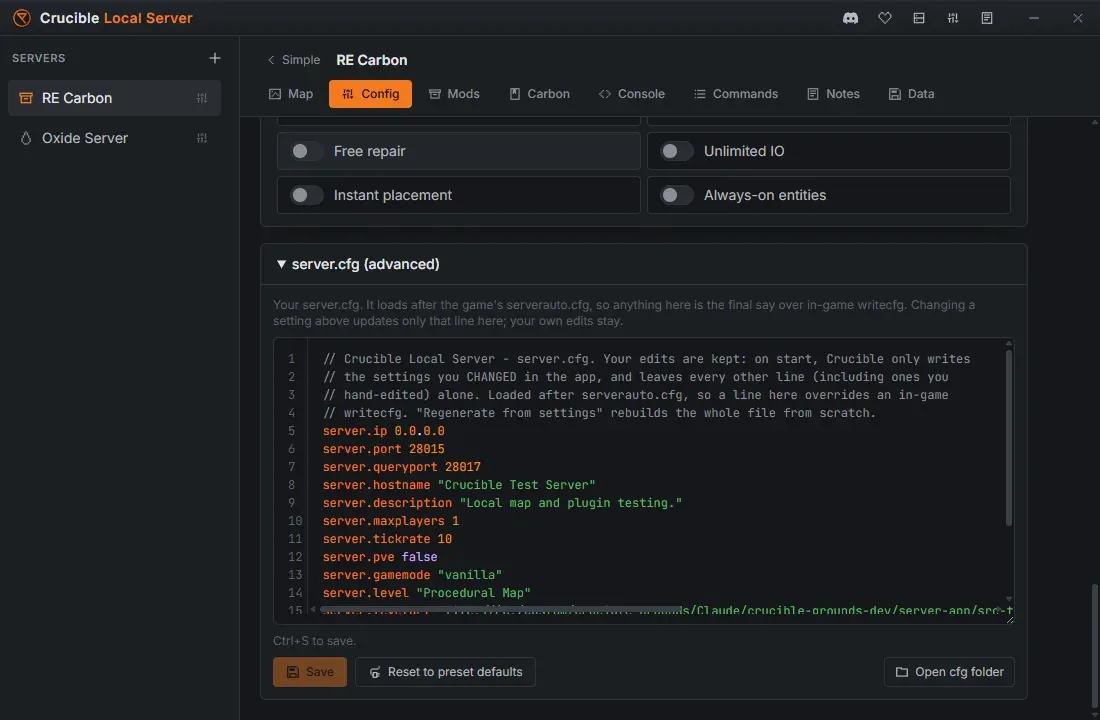
The important part is how the two halves get along:
- Your edits are kept. Changing a setting in the form above rewrites only that one line in the file. Every other line, including ones you wrote yourself and your comments, is left exactly as it is.
- A hand-edited line updates the form. Type a convar into the file and the matching toggle above turns itself on, so the two can never quietly disagree.
server.cfgloads after the game’s ownserverauto.cfg, so a line here is the final say over an in-gamewritecfg.- Reset to preset defaults puts the settings and the file back to the preset the server was created from, keeping its name, ports, RCON password and admins.
Settings changes are written to the file straight away, and take effect the next time the server starts. The live server rules also apply immediately over RCON while the server is running.
Under it sits Launch arguments (advanced), the command line itself. That is where a Rust option that is a switch rather than a convar has to go, because server.cfg cannot set one. See launch arguments and command-line switches.
Related
Section titled “Related”- Launch arguments and command-line switches for options
server.cfgcannot set. - Console, RCON, and admin tools to drive a running server.
- Restart your server automatically.
- Create your first Rust server.