
Time and weather
Move the sun, and make the sky overcast or stormy, so you can judge your map at the hour you care about. A coastline reads completely differently at dawn than at noon, and a cliff face you were happy with can turn into a black wall once the sun is behind it. Open the panel with VIEW > Time / Weather….
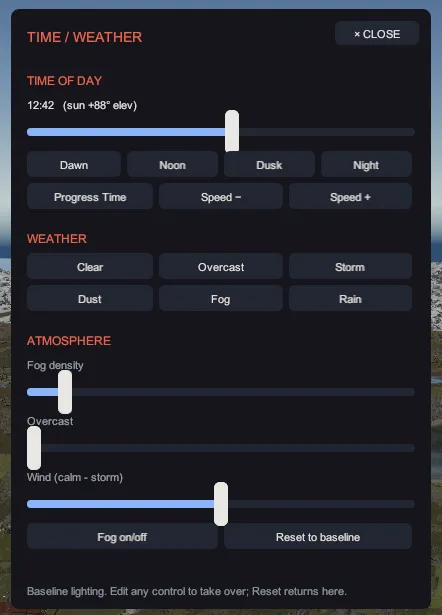
Nothing in this panel is saved into your map. These are view settings for the editor, kept in your
own settings and nowhere near the .map file. In game, the server decides the time and the weather,
so what you set here changes what you see while you work and nothing a player will ever see.
Time of day
Section titled “Time of day”The readout above the slider shows the hour and the sun’s elevation, so you can tell a low sun from a sun below the horizon at a glance.
- Drag the time slider, which covers a full 24 hours.
- Or click a preset: Dawn, Noon, Dusk or Night.
- Click Progress Time to let the clock run, and Speed − or Speed + to change how fast.
| Preset | Hour |
|---|---|
| Dawn | 06:30, just after sunrise, so the sun is a low warm disc. |
| Noon | 12:00, the sun straight overhead. |
| Dusk | 17:30, just before sunset. |
| Night | Midnight, the sun straight down and the scene fully dark. |
Sunrise is 06:00 and sunset is 18:00, and the sun follows a smooth arc between them, so any hour you pick puts it where that hour would.
Weather
Section titled “Weather”Six presets: Clear, Overcast, Storm, Dust, Fog and Rain. Each one seeds the whole atmosphere at once: fog density and color, how gray and flat the sky is, how much the sun is dimmed and tinted, the ambient light level, and the wind.
Rain and snow do not fall. Creator has no precipitation system, so Rain and Storm render their sky, their fog and their darkness, which is what changes how your map looks, and no particles come down. That is worth knowing before you go hunting for the setting that turns them on.
Atmosphere
Section titled “Atmosphere”Three sliders fine-tune whatever a preset seeded:
| Slider | What it drives |
|---|---|
| Fog density | How thick the fog is. |
| Overcast | How gray and flat the sky and the lighting are. |
| Wind (calm - storm) | The ocean. It scales the swell speed and the water’s wave shape from calm through to storm, and the ocean is the only surface that responds to it. |
Fog on/off is a master switch for fog, and Reset to baseline returns everything to clear weather at noon.
The status line at the foot of the window tells you which state you are in. Before you touch
anything it reads Baseline lighting. Edit any control to take over; Reset returns here. After that
it names the weather, whether the clock is running and at what multiplier, and reminds you that this
is VIEW-only (not saved to map).
One case where the panel deliberately does nothing: during the diagnostic run you attach to a
bug report, the lighting is pinned to the baseline so that two runs can be
compared, and the panel says
Capture context: lighting is pinned to the baseline (panel inert) rather than accepting a change
that would not take.