
Import a RustEdit map
Creator opens a map somebody else built in RustEdit, shows you what is in it, lets you edit it, and saves it so a RustEdit server still runs it exactly as it did. That includes the things Creator cannot author itself: another editor’s wiring, loot, vending, NPC spawners, patrol paths and custom-prefab groups all survive the round trip.
Open it
Section titled “Open it”Nothing special. Paste or BROWSE to the file under LOAD MAP on the start screen and press
>> LOAD + BUILD <<. It is a standard Rust .map, whatever wrote it.
You are told what it carries
Section titled “You are told what it carries”On load, Creator raises one informational message naming what it found, for example “This map carries RustEdit data (9 families)”, followed by how many of them it shows, how many it is only carrying, and anything it could not read. It is information, not a warning: a map carrying another editor’s data is the normal case here.
For the detail, open HELP > MAP DATA, headed Map Files From Other Editors. Its Data From Other Editors list names every family the file holds, how much of it there is, and whether this build shows it, carries it, or could not read it.
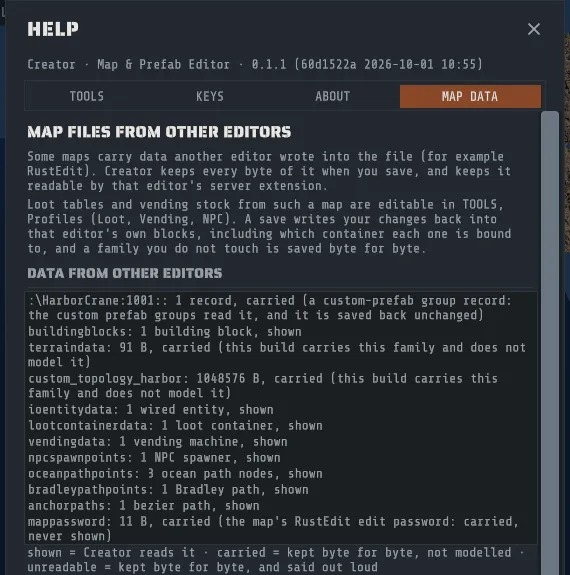
A map with no RustEdit data in it says nothing at all and lists no rows. Silence means a clean map.
What is shown, and what is only carried
Section titled “What is shown, and what is only carried”| Creator reads and shows it | Creator keeps it byte for byte and does not read it |
|---|---|
| IO and electrical wiring, with every per-entity setting | RustEdit’s own editor-side terrain settings |
| Loot container profiles, and you can edit them | Its topology layer lookup, and any custom topology layer |
| Vending machine stock, and you can edit it | The map’s edit password (listed by name and byte length only, never shown) |
| NPC spawn points, and you can edit them. On the creator target, Creator’s extension spawns them | Recorded vehicles |
| The ocean patrol path | |
| Bradley routes | |
| Bezier anchor paths, read-only | |
| Building blocks, with their grade. Saved on the creator server target, the Creator extension gives each one that grade, full health for it, and protection from decay and collapse | |
| Custom-prefab group records: the group is shown, and moving it moves the whole pack |
Everything in both columns is preserved when you save. The difference is only whether this build can show you the contents.
Editing the map’s loot and vending
Section titled “Editing the map’s loot and vending”Open TOOLS > PROFILES. A RustEdit map’s own loot tables and vending shops are already in there, with the
items, the amounts, the respawn and refresh windows, the sell orders and the prices the other editor’s author
set, and with the list of containers each one is bound to. Edit them exactly as you would a profile you
created: change an item’s amount, add a sell order, attach a profile to another container you have selected,
or remove a binding with the × beside it.
Two things are worth knowing about how that saves.
- A family you do not touch is saved byte for byte. Opening the panel and looking at a loot table is not an edit, and neither is an edit you undo: Creator compares the content, not your clicks, so a map you did not change in the panel comes out with those blocks identical to the ones that went in.
- A binding lives on the container, not in the table. RustEdit records which loot table a container uses on the container itself, so when you attach or remove one, Creator writes that onto the container prefab and a RustEdit server reads it the same way. Moving a bound container keeps its binding, with nothing for you to redo.
One limit, and Creator says so rather than writing something wrong: a profile name cannot contain a colon. That character separates the fields of the binding RustEdit reads, so a name containing one would arrive at the server cut short and bind to nothing. Rename the profile and save again.
A few Creator-only fields have no home in RustEdit’s own format (the roll window, the clear-the-container flag, an item’s selection weight or skin, a shop’s separate display name). They are kept in Creator, and a save that writes back to RustEdit’s blocks tells you which ones it could not carry.
Editing the map’s NPC spawners
Section titled “Editing the map’s NPC spawners”The NPC SPAWNERS tab of the same panel holds them. A RustEdit map’s spawners are point-shaped, one point per NPC, so Creator groups the ones that share a type and a respawn window and shows you one group with its points: change the respawn window, add or remove a point, or add a group of your own. Each group already carries the NPC prefab its type spawns, so it works on a server without you choosing one.
Two things are specific to this tab.
- A spawn point is a fixed world position. It never belonged to a prefab, so moving or deleting a building beside it leaves it exactly where it is. That is the opposite of a loot binding, which rides on the container and travels with it, and the panel says so under the point list.
- RustEdit’s format holds one NPC type per spawner. A group you give several prefabs, or a prefab that is
not one of the seven types RustEdit can name, cannot be written into its block: on the
rustedittarget the save tells you which group and leaves the rest untouched. On thecreatortarget there is no such limit, because Creator writes its own block.
The one rule that matters
Section titled “The one rule that matters”RustEdit addresses its data by a name computed from how many prefabs the map has, so deleting a single rock would strand all of it. Creator re-keys every one of those names on save, so it keeps working.
That is worth understanding because of how it fails without it: nothing errors. The bytes are all still in the file, under names that no longer match, and the server quietly applies nothing. Creator recomputes the names from the count the map was loaded with to the count being saved, and prints a line per family so you can see it happened.
Editing one
Section titled “Editing one”Ordinary edits work, and the parts of the map that describe positions follow.
- Move a prefab and the RustEdit data bound to that prefab moves with it. A free-standing point that never belonged to a prefab (an ocean node, a Bradley waypoint, an NPC spawn point, a bezier handle) is left alone even when a prefab happens to be sitting on it.
- Delete a wired entity and its wire becomes a hole at its own slot rather than shifting the others along. Undo puts it back.
- Resize the map and Creator refuses by name for families it cannot honestly rescale: a custom topology layer is a grid at the map’s own resolution, and RustEdit’s opaque terrain settings might or might not describe the map’s size. It tells you which families blocked it and leaves the map untouched. Rescaling data it cannot read would be the silent-failure case this whole page exists to avoid.
What a saved map runs on
Section titled “What a saved map runs on”Creator writes a map for a server target, chosen under Server target in HELP > MAP DATA. The
default, KEEP COMPATIBLE (the rustedit target), keeps the map working on a server running RustEdit.Ext:
that editor’s own blocks stay in the file with their names re-keyed, so the extension still finds your
wiring, loot, vending and NPC spawners after you add or delete even a single prefab. CREATOR BLOCKS (the
creator target) writes Creator’s own blocks for everything Creator can fully replace and keeps the other
editor’s originals byte for byte in the .rcside beside the map, so nothing is lost and nothing is applied
twice; the Creator-side server extension that reads them is still being built, so KEEP COMPATIBLE is the
choice to ship on today. Either choice takes effect at the next save, and undo reverts it.
So: keep RustEdit’s own server extension installed for a map that came from RustEdit, which is where Drizzza’s build order ends too, and use Creator’s own extension for the features you add in Creator. They read different blocks and do not collide.
What Creator deliberately does not do
Section titled “What Creator deliberately does not do”- It does not treat the map password as access control. The password block is listed and preserved. Anything more would be pretending a field is a lock.
- It does not author RustEdit’s opaque layers. They are carried, never written.
- It shows bezier anchor paths without letting you edit their handles. Editing them wants a path-tool job of its own.
- It does not write patrol paths as its own data. It reads RustEdit’s, and keeps them RustEdit’s.
Anything else it cannot honor is refused with a reason rather than mis-described. That is the rule the whole feature is built on.
What has been proven
Section titled “What has been proven”Three real community maps have been loaded, edited (one prefab deleted, through the ordinary delete), saved through the real save path, and checked block for block: the same families, the same counts, every name decoding correctly at the new prefab count. The largest carried over 127,000 prefabs and about 7 MB of wiring. The control case, the same edit with the re-keying switched off, fails the same check, which is how we know the check can see the defect.
What has not been proven by us is the last step: taking one of those saved maps and running it on a live RustEdit server. If you do that, the outcome is worth a message either way. See Report a bug.