
Application settings and storage
The Settings button in the titlebar, a small sliders glyph in the icon cluster on the right, opens the app’s own settings: what Crucible Local Server has installed on your disk, and the four options that change how it behaves. The language is set once for every app, from the language icon in the launcher.
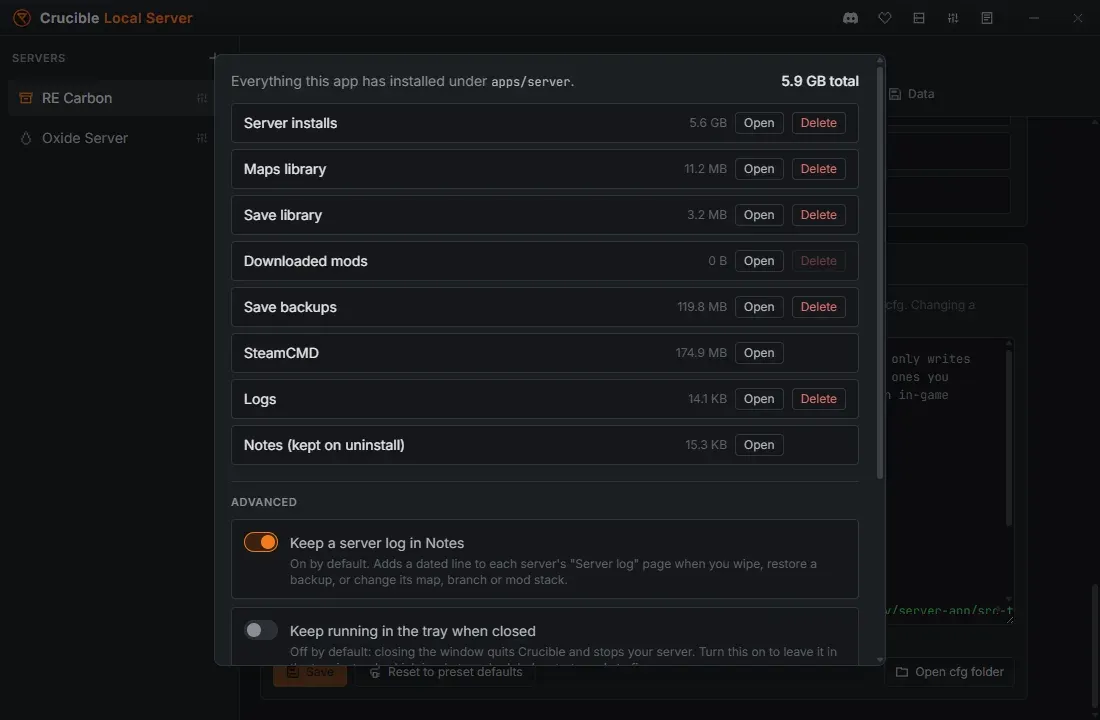
Storage
Section titled “Storage”Every folder the app has written, with its size, an Open button, and a Delete where it is safe to delete:
- Server installs: the Rust dedicated server files, the big one (about 6 GB per install).
- Maps library, Save library, Save backups, Downloaded mods, Logs.
- SteamCMD: the app’s own toolchain, so it has no Delete.
- Notes (kept on uninstall): your per-server notebooks. The row says it because they live outside the app’s data folder on purpose, so uninstalling the app never takes your notes with it. There is no Delete here for the same reason.
An install cannot be deleted while a server that uses it is running, and removing one tells you which servers lose their world with it.
Open data folder at the bottom of the panel opens the whole Crucible Local Server tree in Explorer, and the app’s version is printed next to it.
Keep running in the tray when closed
Section titled “Keep running in the tray when closed”Off by default: closing the window quits Crucible and stops your server.
When Crucible exits, the server stops with it. Turn this on and closing the window leaves the app in the system tray instead, with the server still running. Quit from the tray icon to shut down cleanly.
A scheduled restart can only fire while Crucible is running, so an overnight restart needs this turned on.
Update server files on start
Section titled “Update server files on start”On by default. When you start a server, the app checks whether the branch has a newer Rust build and installs the update first, so players never join an outdated server and get version-kicked. Routine updates only pull what changed.
Allow multiple servers running at once
Section titled “Allow multiple servers running at once”Off by default: one server at a time. Turn it on to run several together, for example a vanilla server and a modded one, or two different branches. Each server has its own ports, its own world and its own console.
Every running server costs RAM and CPU, and a Rust server is not cheap, so this is a deliberate opt-in rather than the default.
Keep a server log in Notes
Section titled “Keep a server log in Notes”On by default. Adds a dated line to each server’s Server log page in Notes when you wipe, restore a backup, or change its map, branch or mod stack, so the history of a world is written down without you doing it.
See what changed in this version
Section titled “See what changed in this version”Next to Settings in the titlebar is a Changelog button. It opens the app’s own changelog, newest release first, with the version you are running badged, so you can check what a self-update just brought in without leaving the app. The same list is on the changelog page.
Related
Section titled “Related”- Restart your server automatically needs the tray option.
- Install Crucible Local Server and the Rust server files.
- Notes for every server.