
Prefabs
Everything on a Rust map that is not terrain is a prefab: monuments, rocks, trees, barrels, doors, lights, the lot. Creator places the game’s own prefabs out of your content snapshot, which is why what you see in the editor is what players see on the server.
The Prefab Browser
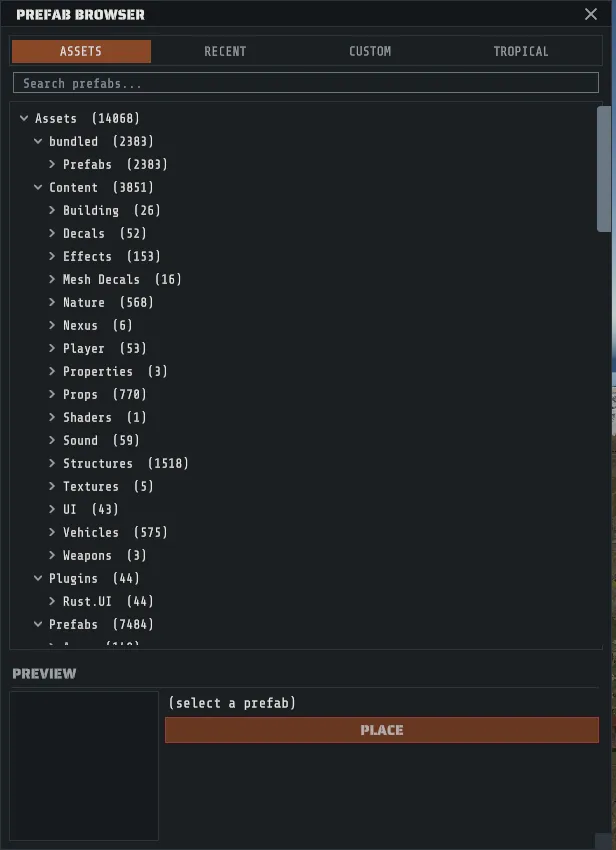
Section titled “The Prefab Browser”R opens it, and so does the rail button under the divider. Three tabs across the top:
| Tab | What is in it |
|---|---|
| ASSETS | Every prefab the game has, as a folder tree built from the prefab paths |
| RECENT | The last twenty you placed, newest first |
| CUSTOM | Your own saved collections. See Custom prefabs |
The search box filters the whole tree, and while you are searching every folder opens so matches are visible. Clear the search and the tree goes back to the folds you left it in. Long lists are capped, so narrow with the search rather than scrolling for a prefab near the end of the alphabet.
Preview before you place
Section titled “Preview before you place”Click a leaf row once to select it, and the preview pane below the tree renders that prefab in 3D. Drag inside the preview image to spin the model.
A prefab you have never placed has to be pulled out of the game’s asset bundles first, and a big one
takes a moment. The preview says (loading… 3s) with the seconds counting up while that happens, which
is honest progress rather than a bar that pins at 90 percent. If the prefab has no render mesh at all
it says (no render mesh), and that is the answer rather than an error: a few prefabs in the game’s
manifest are logic with nothing to draw.
Three ways, and they all do the same thing.
- PLACE in the preview pane.
- Double-click the row in the tree.
- Click a card’s PLACE in the CUSTOM tab, for a whole saved collection.
A placed prefab lands 25 meters in front of the camera, sitting on the terrain, and it goes onto the
undo stack as one step named after it, so the EDIT menu’s undo entry reads Undo Place plus the
prefab’s name and you can see what Ctrl+Z will take back. Point the camera where you want the thing
before you place it, then use the gizmos: see
Select and transform.
Keep a busy map workable
Section titled “Keep a busy map workable”A generated 4000 map holds tens of thousands of prefabs, so the tools that matter are the ones that get things out of your way.
| Tool | Where | What it is for |
|---|---|---|
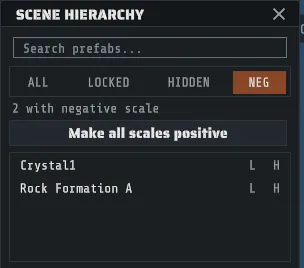
Scene Hierarchy (H) | The rail, or VIEW | Every placed prefab as a searchable list, one row per prefab by name (hover a row for its full path). Click a row to select it, then press F to fly to it |
| The ALL / LOCKED / HIDDEN / NEG filters | In that panel | Show only what you have locked, only what you have hidden, or only the prefabs with a negative scale axis |
Lock (Ctrl+Shift+L) | EDIT, the context menu, the inspector’s ... | Keeps a prefab selectable but refuses to move or delete it |
Hide (Ctrl+Shift+H) | The same three places | Takes it out of the view and out of the way. Unhide All is Ctrl+Alt+H |
| Selection groups | Ctrl+Shift and a digit to assign, Ctrl and the digit to recall | Named-by-number sets of prefabs you keep coming back to |
Right-clicking a prefab (without dragging, because a right-drag flies the camera) opens the context menu: Lock, Hide, Duplicate, Snap to Ground, Copy Transform, Paste Transform, Delete, and the workspace entries from Custom prefabs.
Monuments are prefabs with terrain attached
Section titled “Monuments are prefabs with terrain attached”A monument carries its own authored terrain work: the height it flattens, the ground textures it paints, the topology it claims, the holes it cuts. Generation applies all of that as it places the monument, which is why a generated map’s monuments sit in ground that fits them.
A monument you place or move by hand does not stamp itself. The Prefab Modifiers section of the transform inspector is how you apply it: one button per mask that monument actually carries, each one undo step, at wherever the monument is standing now. So the sequence for moving one is move it, repair the ground it left with sculpting and painting, then apply its masks at the new position. Where monuments sit on a generated map, and why, is Monuments and where they go.
Refresh Spawn Instances, in the same section, rebuilds the prefab’s own spawned contents.
Break a monument into its pieces
Section titled “Break a monument into its pieces”Select one monument on the map, right-click it and choose Break Monument Into Prefabs. Creator reads the monument’s pieces first and then asks before it changes anything.
- Only a monument built entirely from placeable prefabs can be broken. If any part of it is geometry that exists only inside the monument, the break is refused with the number of pieces it could not carry, and the monument is left exactly as it was. Small caves, lakes, oases, canyons, the jungle ruins, the desert military bases and the underwater labs break cleanly; most large monuments do not.
- The confirm says what happens. Each piece becomes its own placed prefab you can move, copy or delete. The monument’s own function is lost: its map marker, loot, NPC spawns, puzzles and triggers do not come with the pieces. The ground under it stays as it is.
- A piece the monument changed is kept as it was. Where the monument’s version of a piece differs from the game’s standard one, that piece is saved as a custom prefab in your library (the CUSTOM tab of the browser) and placed as those prefabs, so it looks the same after the break. The whole broken monument is saved there too, as one pack you can place again elsewhere.
- The pieces stay one object until you ungroup them. Clicking any piece selects the whole group, so it
moves as one. Hold
Altwhile clicking to pick a single piece, or right-click and choose Ungroup Custom Prefab to let every piece move on its own. - One undo puts the monument back. The files saved to your library stay there.
Breaking works on the map. To rearrange the pieces in the prefab workspace, break the monument first, select the pieces and use Edit Selection In Workspace.
Negative scale
Section titled “Negative scale”A mirrored prefab (any scale axis below zero) saves and loads perfectly and looks right in the editor, and then breaks collision on a server. The NEG filter in the hierarchy finds them, Make all scales positive flips them all positive as one undo step, and a preference clamps typed values so they cannot come back. The details are on Select and transform.
Importing prefabs from elsewhere
Section titled “Importing prefabs from elsewhere”| Source | How |
|---|---|
| A building from the CopyPaste plugin | FILE > Import CopyPaste… reads the plugin’s JSON export and places its entities as prefabs, one undo step |
A RustEdit custom prefab (.prefab) | Put it in your custom-prefab folder and it appears in the CUSTOM tab. See Custom prefabs |
| A whole RustEdit map | See Import a RustEdit map |
What Creator will never do
Section titled “What Creator will never do”Creator only places prefabs that already exist in Rust. It will not build custom items with custom models, because that needs modified client files and puts everyone who plays your map at risk of an anti-cheat ban. Every prefab in the browser is stock content out of your own install, which is also why the browser is empty until your content is synced.