
Volumes
A volume is a box or a sphere you draw on the map to mark a region: radiation here, a safe zone there, no building inside this shape. Rust has no map prefab that makes a region behave, so a volume is data rather than an object, and it is read on the server by an extension rather than by the game itself.
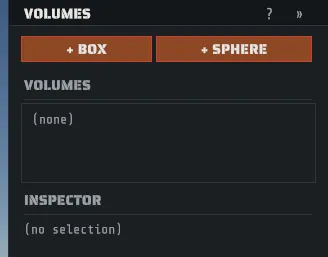
Press V or pick Volumes on the tool rail. The status bar then reads:
LMB pick volume · drag to move · axis handles resize · Del removesA volume marks a region. It is never geometry in your map. Nothing is placed, nothing is drawn in game, and no prefab stands in for it. That is deliberate: a wrong prefab standing in for a region would leak into the game as a visible object.
Place one
Section titled “Place one”- Click + BOX or + SPHERE. The new volume is 5 m in every direction and appears at the center of the map at sea level, not under your cursor.
- Pick it in the list, or click it in the viewport, then drag it where you want it.
- Drag an axis handle to resize it, or type exact numbers in the inspector: radius for a sphere, half X, half Y and half Z for a box. Half extents are measured from the center, so a half X of 20 is a 40 m wide box.
- Set kind from the dropdown.
- Press Del to remove the selected volume.
Every place, move, resize and delete is one undo step. A right-click or Esc while you are still dragging a volume cancels the drag and puts the volume back where it was.
The kinds
Section titled “The kinds”The dropdown offers six, and a new volume starts as custom. Two columns matter as much as the
first: whether the kind travels inside the .map itself, and whether the Creator server extension
enforces it.
kind | What it is meant to mark | Travels in the map | Enforced by the extension |
|---|---|---|---|
radiation | A radiated region. The amount belongs in a parameter. | yes | yes |
comfort | A comfort region, as a campfire gives. | yes | yes |
prevent_building | A region nobody may build in. | yes | yes |
safezone | A region where players cannot hurt each other. | yes | yes |
spawn | A region used for spawning. | yes | no, not yet |
custom | Anything your own plugin wants to read. | no, sidecar only | no, by definition |
custom is the one kind that cannot travel in the map, and that is deliberate rather than a gap:
the map’s own data uses a fixed list of kinds so a server can know what each one means, and a name
you invented is not on it. A custom volume is saved in the sidecar beside the map (below), and
Creator tells you how many stayed behind each time you save.
spawn travels but is not enforced yet: the region is recorded in your map and any plugin can read
it, and the extension prints a line saying it found one and did not bind it.
Parameters
Section titled “Parameters”A kind says what a region is; a parameter says how much. Click + PARAM to add a named number to
the selected volume, then type a name and a value into the two fields. The x chip on a row removes
it. The list is free form on purpose: whatever reads your volumes on the server decides which names
it cares about, and Creator does not restrict them.
One name is special: amount. On a radiation or a comfort volume, a parameter named amount
is the one that travels inside the map and the one the Creator extension reads, as the radiation dose
and the comfort value. Every other name you type stays in the sidecar, which is what you want for a
plugin of your own, and Creator counts them when it saves so nothing disappears quietly. A
radiation volume with no amount gets the game’s own low radiation tier.
Seeing them
Section titled “Seeing them”The overlay draws every volume while the Volumes tool is active, tinted by kind. In the other tools, two switches in the VIEW menu decide which outlines you see. Both start off, so a fresh install shows no volume outlines outside the Volumes tool until you turn one on (Creator remembers your choice). If an earlier version left a switch on, this version turns both off once, the first time it starts; after that, whatever you choose is kept.
- VIEW > No-Build Zones shows every no-building area: the game’s own prevent-building volumes
(the ones that came with the map, the ones a generated bridge places), each monument’s own
no-build zones (the areas inside a monument where the game refuses a building, drawn as the
box or sphere the game checks), and any volume of your own whose kind is
prevent_building. - VIEW > Volume Overlay (
Ctrl+Shift+B;Ctrl+Shift+Wis water) shows every other volume: safe zones, radiation and comfort volumes, the game’s other volume prefabs, the environment volumes inside each monument (the boxes that mark its indoor, underground and tunnel spaces, in gray), and the rest of your own.
A monument’s own outlines follow the monument when you move, rotate or scale it, and disappear when you delete it. They are drawn out to the prefab draw distance, like the monument itself, and they are never clickable: select the monument instead. A monument’s radiation and safe-zone areas are not drawn yet.
When you turn a switch on and the map has nothing of that kind, Creator says so (“No no-build zones on this map” or “No volumes on this map”) instead of changing nothing in silence.
While a switch is off, those outlines are hidden everywhere except the Volumes tool, where your own volumes always show so you can edit them. A hidden outline cannot be clicked either.
The game’s own volume prefabs
Section titled “The game’s own volume prefabs”Rust ships its own volume prefabs, the ones you find in the prefab browser under
modding/volumes_and_triggers (prevent_building_cube, prevent_building_sphere, safezonesphere,
the comfort volumes, and the rest of that family). Those are ordinary prefabs that you place and that
travel inside the .map like any other, and they are a different thing from the volumes above: the
game itself reads them, so they need no extension.
They carry no model, which used to make them invisible and unclickable: you placed one and saw nothing at all. Creator now outlines every member of that family wherever it stands, in every tool, once the matching VIEW switch below is on, and you can click the outline to select the prefab. Three things are worth knowing about the outline:
- It is sized by the scale you placed the prefab at, because that is what the game goes by.
- A sphere really is treated as a sphere, when it is drawn and when it is clicked, so the corner of its bounding box is not a hit.
- A volume you are standing inside is not a hit either, which keeps a region you are working in from swallowing every click.
Turn the outlines on or off with the two VIEW switches above, which both start off: No-Build Zones for the prevent-building family, Volume Overlay for the rest. Toggle Volume Proxies, on the right-click menu over a prefab, flips both at once (off if either is on, otherwise on). It is a view preference and works whether you are on a map or in the prefab workspace.
Where volumes are saved
Section titled “Where volumes are saved”Volumes are saved in two places, and knowing which is which is the whole of this section.
The sidecar is a file named after your map, <your map>.rcside, written next to the .map. It
holds every volume you drew, custom ones included, with all their parameters, and it is the copy
Creator edits. A map with no volumes and nothing else to record gets no sidecar at all, so a plain
map stays a plain file.
The map holds the volumes whose kind is on the fixed list above, copied in each time you save,
with the position, the size, the rotation and the amount. That copy is what a server reads.
What happens on a server
Section titled “What happens on a server”A volume rides out of the editor inside your map’s own Creator data, and a server has to be told what to do with it, which means it needs the server extension: see Run your map on a server.
With the extension loaded, four of the six kinds are enforced by the game’s own machinery: a
radiation region really irradiates, a comfort region really warms, a safezone region really
stops players hurting each other, and a prevent_building region really blocks building. Each one
is the same component and collider the game uses for its own monuments, so it behaves the way the
monument version behaves. The server prints one line per volume at boot and a summary saying how
many it applied and how many it skipped, so a map that behaves oddly can be read off the log.
Two honest limits. A comfort region falls off from its center outward even when you drew a box,
because that is how the game’s own comfort trigger measures; draw a sphere if you want the shape to
match the effect. And a spawn region is recorded and not applied: binding where players spawn is
not in this release, so the region travels with your map and the server says it found one.
The whole step can be turned off on the server with RC_EXT_VOLUMES=0, which leaves your volumes in
the map, reads them, reports them, and enforces nothing.
Not yet confirmed on a live server. The volume step is new, its logic is covered by tests, and the parts of it that talk to the running game are due to be watched on a real server. If you run one, read the boot log and check the regions do what you drew.