
Export a Rust .map file (the main RustEdit export)
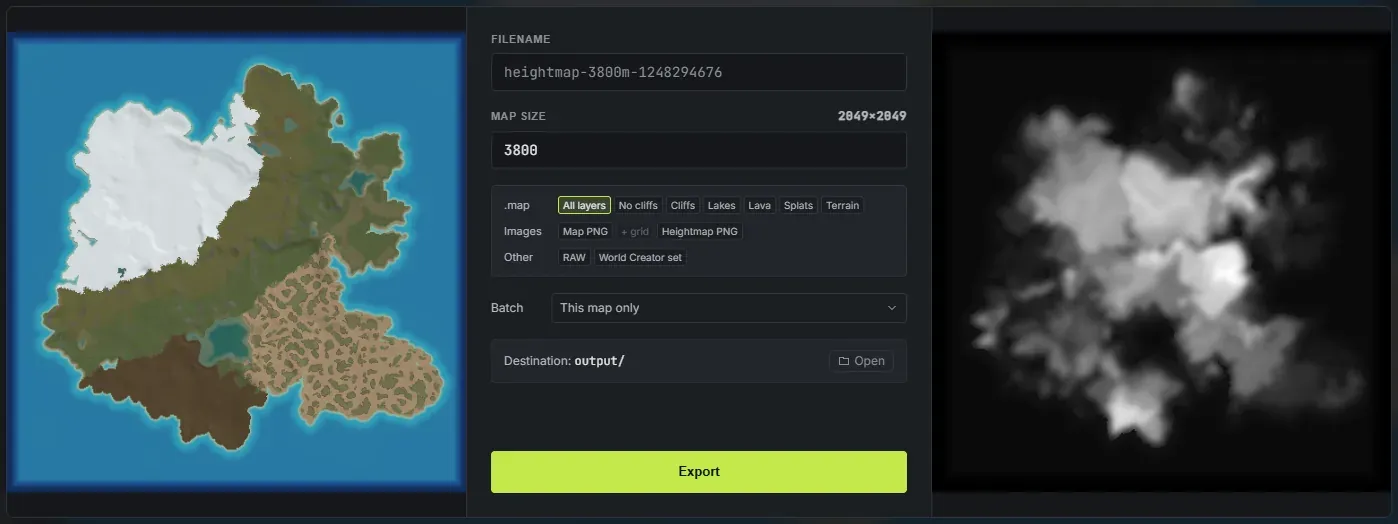
Crucible Heightmap can export your map as a Rust .map file: the same file format Rust and RustEdit use for a complete map. This is the main, recommended export (it is the default in the export panel), ahead of the older .raw heightmap route. The advantage over the World Creator splat import is that a .map opens directly in RustEdit in one step, with your terrain height and your painted ground textures (splats) already in place. There is no World Creator importer to run and no separate file set to line up: you open one file and your map is there.
Why a .map export?
Section titled “Why a .map export?”The World Creator route brings the same height and splats across, but you import a folder of files through RustEdit’s World Creator importer and then take care to protect your terrain during proc gen. The .map export is the shortcut:
| World Creator import | .map export | |
|---|---|---|
| Terrain height | Yes | Yes |
| Painted splats | Yes | Yes |
| How it opens in RustEdit | Through the World Creator importer | Open the file directly |
| Files to import | A folder of files | One .map file |
| Biomes and topology | Added in RustEdit | Carried in the file |
| Lakes, lava and cliffs | Added in RustEdit | Carried in the file |
The .map export is the far more complete route. The World Creator import can only carry height and splats, because that is all its importer accepts. A .map file carries the whole world: your terrain, your ground textures, and every layer the worldgen derived, including real biomes, all the topology layers, lakes as real water bodies, a volcano’s lava, and Rust’s own cliff and rock models.
How to export a .map
Section titled “How to export a .map”- Build your map: generate and sculpt the terrain, then paint any splats you want.
- Generate the world so the map has biomes, topology, lakes and lava. (You can skip this. See below for what a plain map ships as.)
- Open the export panel. The top row is labelled .map and All layers is already picked.
- Export. Crucible writes a single
.mapfile into your output folder.
The seven .map versions
Section titled “The seven .map versions”The .map row holds seven chips and you pick one of them, because they are seven versions of the same file. They differ only in how much world comes with the terrain. Clicking the picked chip again turns the .map off entirely, if all you want is a picture or a .raw.
- All layers (the default): everything. Your terrain, your ground textures, and every layer the worldgen derived, plus Rust’s real cliff and rock models on the steep ground, every lake as a real water body, and a volcano’s lava.
- No cliffs: everything above except the cliff and rock models. The biomes, the topology, the lakes and the lava all still ship.
- Cliffs: the cliffs on their own. Every lake is handed back to the ocean and no lava is placed, so a lake’s
LakeandLakesidelayers becomeOceanandOceansideand a basin below sea level fills with sea instead of sitting empty. - Lakes: the lakes on their own. No cliffs and no lava.
- Lava: a volcano’s lava on its own. No cliffs, and every lake is handed back to the ocean. On a map with no volcano it adds nothing.
- Splats (biomes and splats only): your terrain, your ground textures and the biomes, with no topology layers, no cliffs, no lakes and no lava. For when you want RustEdit’s own proc gen to lay the rest down.
- Terrain: bare terrain, no ground textures and no world layers. For when you want to do all the world building in RustEdit yourself.
The cliff, lake and lava outputs are self-contained: they are generated at export, so you get them whether or not Generate cliffs, Generate lakes and Generate lava are ticked in the Worldgen panel. Those three only decide what you preview while you work.
How to open it in RustEdit
Section titled “How to open it in RustEdit”In RustEdit, open the exported .map file directly. Your terrain, ground textures, biomes, topology, lakes, lava and cliffs all load together. From there you finish the map the usual way: place monuments, roads and prefabs, then test it on a local server. You can also skip RustEdit entirely for a quick look: Crucible Local Server finds your Crucible exports on its own and lists them in its map menu, so a freshly exported .map is one click from running.
A map you never ran the worldgen on still exports a valid Rust world. It simply arrives as fully Temperate, with terrain and ground textures, and you add the climate in RustEdit.
Which export should I use?
Section titled “Which export should I use?”- Want the fastest path into RustEdit, with the whole world in one file? Use the
.mapexport with the default All layers. - Following an existing World Creator workflow? The World Creator import brings the same height and splats across a folder of files.
- Just need bare terrain for a manual RustEdit heightmap import? Export a plain 16-bit .raw and follow how to make a custom Rust map.