
Keyboard shortcuts
The full list is also in the app under Settings, Keybinds, where every keyboard shortcut below is rebindable: click an action to capture a new key, with a warning if two actions clash, then Save keybinds. Only the mouse and a couple of held modifiers (Alt to erase, Ctrl + right-click to sample height) are fixed. Your keybinds and slider defaults are saved to their own file, separate from the rest of your settings, so you can hand that one file to another user. Button tooltips in the app always show your own current keys, so they stay correct after you rebind anything.
In the in-game view, W, A, S, D and Q, E drive the fly camera, so the app’s default shortcuts deliberately avoid those keys. The in-game view has its own separate camera keybinds, edited in the same Settings section.
The groups below match the groups in the app’s Keybinds editor. The defaults are:
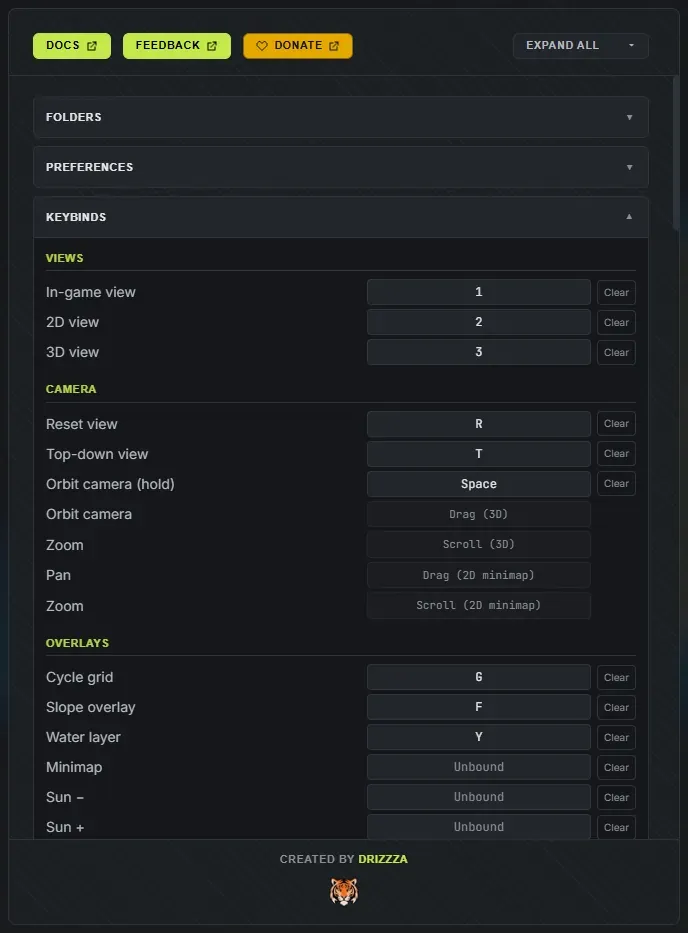
| Key | Action |
|---|---|
| 1 | In-game view |
| 2 | 2D view |
| 3 | 3D view |
Camera
Section titled “Camera”| Key | Action |
|---|---|
| R | Reset view |
| T | Top-down view, snap the 3D camera straight overhead for a flat map-wide look (R returns to the normal angle) |
| Space | Hold to orbit the camera (works while a brush panel is open, so you can reposition mid-paint without laying a stroke) |
Overlays
Section titled “Overlays”| Key | Action |
|---|---|
| G | Grid: from the 3D or in-game view, jumps to the 2D view showing the color map with the in-game grid; in the 2D view, swaps between the color map and the grayscale heightmap |
| F | Slope overlay |
| Y | Water layer, hide the ocean surface to inspect the seabed |
| M | Ramp markers and outlines, in the 2D, 3D and in-game views |
| (unbound by default) | Minimap, hide or show the corner map |
| (unbound by default) | Sun down or up |
Map and islands
Section titled “Map and islands”| Key | Action |
|---|---|
| C | Conjure a new map |
| N | Add island |
| H | Reroll salt, roll new inner terrain (and a new world) without moving the coastline |
| Delete | Delete the selected island(s) or ramp |
| Ctrl + A | Select all islands |
| Ctrl + G | Flip vertical |
| Ctrl + H | Flip horizontal |
With an island selected, a flip mirrors that island in place, keeping its shape, its paint and any baked channel cuts. With nothing selected it takes the whole map: your painted splats, the biomes and topology, and the islands all mirror together, and the position and rotation sliders keep matching the map you can see. Either way it is instant, and it does not reroll your world.
Brushes
Section titled “Brushes”These apply to whichever brush panel is open: the terrain brush, the splat brush, or the biome and topology brushes.
| Key | Action |
|---|---|
[ or ] | Shrink or grow the brush |
| O or P | Rotate the brush footprint (5 degrees per press). It turns whichever brush is open, the terrain brush’s stamp included |
| Tab or Shift + Tab | Next or previous target: the ground texture, the biome, or the topology layer, depending on which brush is open |
| Alt (held while painting, fixed) | Erase |
| (unbound by default) | Hardness down or up |
| (unbound by default) | Spacing down or up |
| (unbound by default) | Clear layer |
| (unbound by default) | Cycle falloff: smooth, linear, sharp, soft |
| (unbound by default) | Cycle stamp shape |
| (unbound by default) | Cycle symmetry: off, X, Y, quad |
Terrain brush
Section titled “Terrain brush”| Key | Action |
|---|---|
| B | Brush mode |
| (unbound by default) | Strength down or up |
| Ctrl + right-click (flatten brush, fixed) | Sample height |
| Ctrl + scroll wheel (fixed) | Brush size, in the 3D view and the in-game view |
| Alt held (fixed) | Run the brush backwards: raise lowers, bluff softens, pucker digs, ripple inverts |
| Key | Action |
|---|---|
| V | Splat mode (opens or closes the splat panel) |
| X | Swap to blend, toggles the brush between your current type and the Blend smudge |
| Alt + right-click (fixed) | Eyedropper, pick the ground texture under the cursor |
World layers
Section titled “World layers”| Key | Action |
|---|---|
| J | Biome brush |
| K | Topology brush |
| L | Channels, cut water clean across the map |
| Alt + right-click (fixed) | Eyedropper, pick the biome or a visible topology layer under the cursor |
Only one of these docks is open at a time, so picking one closes whichever was up.
Neither brush generates a world for you. On a generated map they edit the derived layers; on a bare map the first stroke starts a blank canvas you paint yourself.
History
Section titled “History”Undo and Redo auto-repeat while the key is held. Both pause while a panel is open or a text field is focused, so typing in a box never fires them (your system’s own text undo still works).
| Key | Action |
|---|---|
| Ctrl + Z | Undo |
| Ctrl + Shift + Z | Redo |
Project
Section titled “Project”| Key | Action |
|---|---|
| Ctrl + N | New project (prompts to save unsaved changes first, then clears to a fresh random island) |
| Ctrl + S | Save project (re-saves the open project, or opens the Projects panel to name it the first time) |
| Ctrl + Shift + S | Save project as (opens the Projects panel ready to name a new project) |
| (unbound by default) | Export now, run the export without opening the panel |
| (unbound by default) | Save as seed |
Panels
Section titled “Panels”| Key | Action |
|---|---|
| 4 | Custom island panel, draw or import an island shape |
| 5 | Open Settings |
| 6 | Open Export |
| 7 | Open Projects |
| 8 | Open Saved Seeds |
| 9 | Worldgen panel |
| I | Island randomizer drawer |
| Escape | Close the open panel, otherwise deselect everything |
Drawing pads
Section titled “Drawing pads”The island pad and the channel pad take the keyboard while they are open, so none of the shortcuts above fire behind them. A bare letter cannot conjure a new map or flip a view out from under your drawing, and undo belongs to the pad rather than the map.
Both pads have their own groups in Settings, Keybinds (Island drawing pad and Channel drawing pad), so you can rebind their keys there. A pad key only clashes with another key in the same pad: 1 can pick a brush in the pad and still switch the view everywhere else. Every pad button’s tooltip shows the key it is bound to.
Island pad:
| Key | Action |
|---|---|
| 1 to 6 | Pick a brush: round, coast, blobs, spit, coves, fill |
| 7 | Move, drags the whole drawing around the pad |
| E | Erase, every brush takes land away instead of adding it |
[ or ] | Brush size (Ctrl + scroll over the pad does the same) |
| S | Next symmetry: off, mirrors, then radial |
| G | Grid |
| Tab | Flip the square between your drawing and the terrain it makes |
| Space (held) | Pan the pad |
| Ctrl + Z, Ctrl + Shift + Z or Ctrl + Y | Undo and redo your drawing |
| Enter | Make the map from this shape |
| Escape | Close the panel, your drawing stays in the pad |
Picture editor (the Image tab):
| Key | Action |
|---|---|
| Click, right-click | Add the part under the pointer to the cut, or take it away |
| Shift + click | Take the part under the pointer away |
| Ctrl + Z | Undo the last click or stroke |
| Tab | Flip the square between the picture and the terrain it makes |
| Enter | Make the map from this picture |
Channel pad:
| Key | Action |
|---|---|
| 1 | Draw: left-drag cuts a channel, right-drag puts the land back |
| 2 | Pick: click a cut to move, resize or delete it |
| Ctrl + click (fixed) | Pick another cut, or drop one, in the list or on the map |
| Shift + click (fixed) | Pick every cut in the list from the first pick to this one |
[ or ] | Narrower or wider, for the next cut or the picked ones |
| K | Keep the picked rolled cut as one of your own |
| Delete or Backspace | Delete the picked cuts |
| Arrow keys | Nudge the picked cuts, ten times further with Shift |
| Shift (held while drawing) | Draw a straight line |
| 0 | Zoom back out to the whole map |
| Space (held) | Pan the pad |
| Ctrl + Z, Ctrl + Shift + Z or Ctrl + Y | Undo and redo |
| Enter | Apply |
| Escape | Drop the pick, otherwise close the pad, asking first if you changed anything |
Sliders
Section titled “Sliders”| Input | Action |
|---|---|
| Click or drag | Set value |
| Ctrl + drag | Fine, one step per pixel |
| Tab | Focus the slider (enables arrow keys) |
| Arrow keys | Step by one |
| Ctrl or Shift + arrow | Step by ten |
| Home or End | Minimum or maximum |
| Double-click slider | Reset to default |
| Double-click value | Type a value |
Mouse on the canvas
Section titled “Mouse on the canvas”| Input | Action |
|---|---|
| Double-click (2D or 3D) | Select island |
| Ctrl or Shift + click an island | Add or remove it from the selection (select several at once) |
| Ctrl + A | Select all islands |
| Click water | Deselect all |
| Drag a selected island | Move it (moves the whole selection together; painted textures follow) |
| Drag (3D) | Orbit the camera |
| Scroll (3D) | Zoom |
| Drag (2D minimap) | Pan |
| Scroll (2D minimap) | Zoom |