
Biome painting
The worldgen derives your biomes from the terrain, and it gets most maps right. The biome brush is for the times it does not: you want the snow to reach a particular bay, you want a desert where the generator put grassland, or you just want to hand-place a climate for a build.
Open it with the biome brush button in the toolbar or press J.
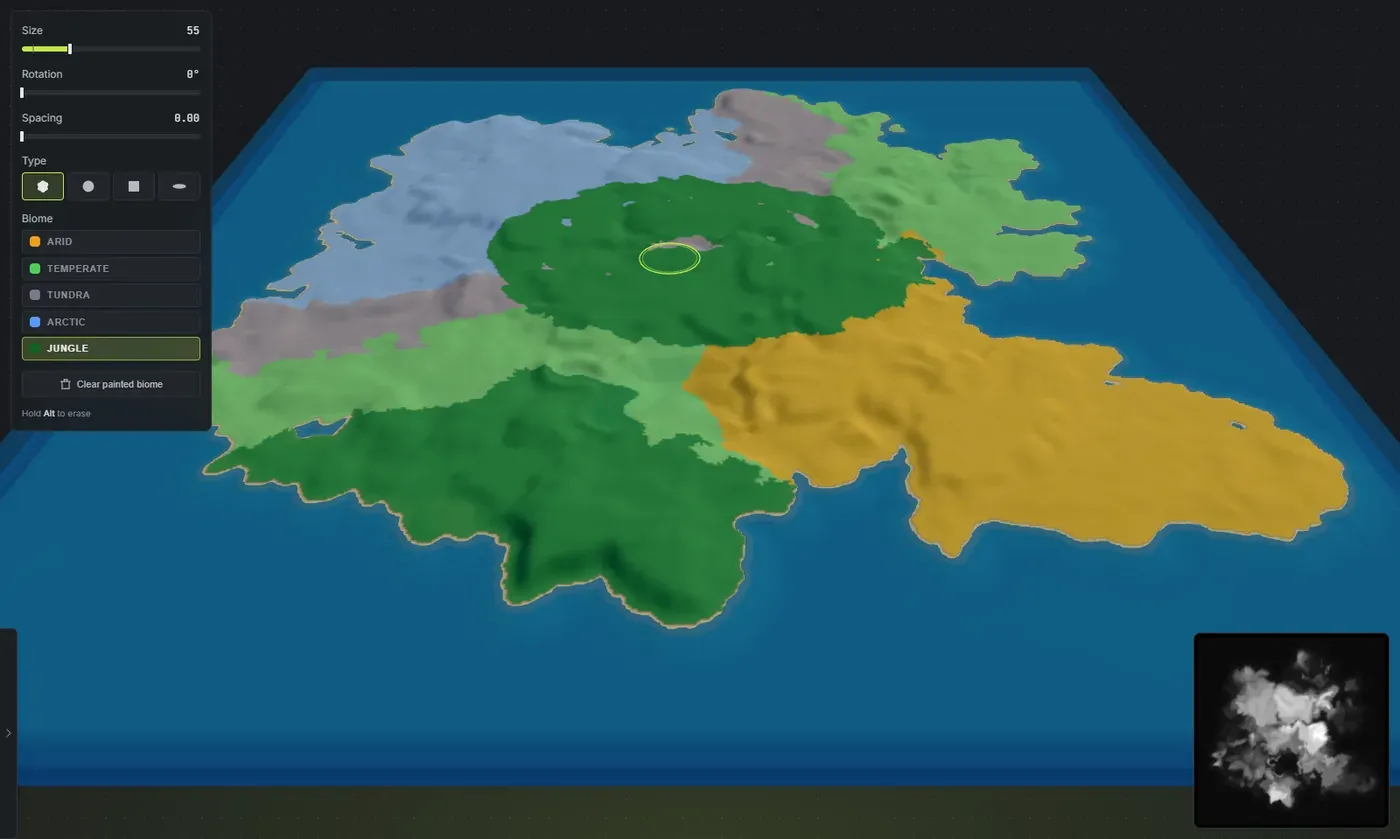
That pale blue sweep is a single Arctic stroke painted straight across temperate ground, with the biome overlay on so you can see exactly what you are doing.
Before you can paint
Section titled “Before you can paint”You do not have to generate first. Opening the brush never generates a world behind your back. There are two ways to work:
- On a generated map, your strokes override the biomes the worldgen derived.
- On a bare or cleared map, your first stroke starts you on a blank canvas: the whole map becomes Temperate with the basic shoreline topology in place, and everything from there is yours to paint. Nothing else is generated for you, so the ground keeps its plain per-island surface.
Where it works:
- The 3D view: always.
- The in-game view: only while Generate cliffs is off. A biome stroke moves the ground the cliffs were placed from, so the two cannot both be live at once. The tooltip tells you which wall you hit.
- The 2D view: not at all. It is a flat height read, with nothing to paint on.
Painting
Section titled “Painting”- Press J.
- Pick a biome from the dock.
- Paint on the map.
The overlay switches itself on when you open the brush, so the regions are visible while you work, and it goes back to how you had it when you close.
The dock:
- Size: how wide the brush is. Biome work is broad, so it starts wide and goes wider. The brush remembers its own size separately from the topology brush.
- Rotation: turns the footprint, for the square and streak types.
- Spacing: at 0 the stroke is one continuous line. Turn it up to stamp separated dabs.
- Type: Fingered, Round, Square or Streak. Biome regions are big soft things, so there is no soft-edge control here: the brush lays down the biome solidly and you shape it with strokes.
- Biome: Arid, Temperate, Tundra, Arctic and Jungle, each with its overlay colour.
Fingered is the default type, and it is the one you want. Its edge is ragged in the same way the generated biome borders are, and a long stroke leaves one continuous interlocking border instead of a row of scalloped blobs. Painted regions sit in the map instead of looking stamped onto it. The other three are there for when you want a deliberate hard edge.
Hold Alt to erase. Erasing paints Temperate, because Temperate is the default state of Rust ground rather than “nothing”. There is no such thing as an un-biomed cell.
Handy keys while it is open:
- Tab / Shift + Tab cycle the biome you are painting.
- Alt + right-click is an eyedropper: it picks the biome under your cursor.
- Ctrl + Z undoes a stroke.
- Escape closes the dock.
- Space held orbits the camera without painting.
Clear painted biome
Section titled “Clear painted biome”Clear painted biome does exactly what it says and nothing more: it throws away your painting and puts the generated biome back.
It does not blank the map, and it does not touch your painted topology. It is an undo for your hand work, not a delete for the world.
What the brush does and does not stick to
Section titled “What the brush does and does not stick to”Biome paint is not per-island. It belongs to the whole map, because the biomes do. Move an island around and the paint does not travel with it the way splat painting does.
It is also not sticky against a re-derive. Anything that regenerates the world (the Regenerate map button, a salt reroll that includes biomes) rebuilds the biomes from the terrain and your painting goes with it.
So the order that works is: finish the terrain, generate, then paint. If you paint first and then reshape the land, expect to paint again.
Painting does ride your undo history and it saves into your project, so it survives a save and reload.
What biomes actually do in Rust
Section titled “What biomes actually do in Rust”A biome is the climate region, and it is a different layer from the ground texture underneath it:
- The splat is the surface: grass, sand, rock, snow.
- The biome is the climate on top: it drives grass colour and density, the ambient light and fog, the weather, and which animals and plants spawn.
The one that trips people up: the green you picture in Rust comes from the Temperate biome, and the snowed-over look on trees and rocks comes from the Arctic biome, not from the snow ground texture. Paint snow ground in a temperate biome and you get white dirt in a green world. The biome is what sells it.
Getting biomes into RustEdit
Section titled “Getting biomes into RustEdit”They come with the map. Export a .map and your biomes open in RustEdit alongside the terrain, the topology and the ground textures, with nothing extra to do. See export a Rust .map file.
- Paint broad. Biomes are regions, not details. If you are painting carefully you are probably fighting the derive instead of using it.
- Set the shares in the Worldgen biome tab first and only brush the parts you want to overrule. Far less work.
- Use Alt + right-click to sample a biome before you extend it, so you match what is already there.
- Remember erase means Temperate.
- Before you move a biome somewhere, check what actually spawns in it. Rust biomes and topology lists every animal, tree and plant per biome, and the ground conditions each one needs.